
Ergonomics
Fit the Work to the Person. Work Smarter. Work Safer.
The Ergonomics Course is designed to provide employees, supervisors, engineers, safety professionals, managers, and workplace teams with practical knowledge of identifying ergonomic hazards and improving the way work is designed and performed.
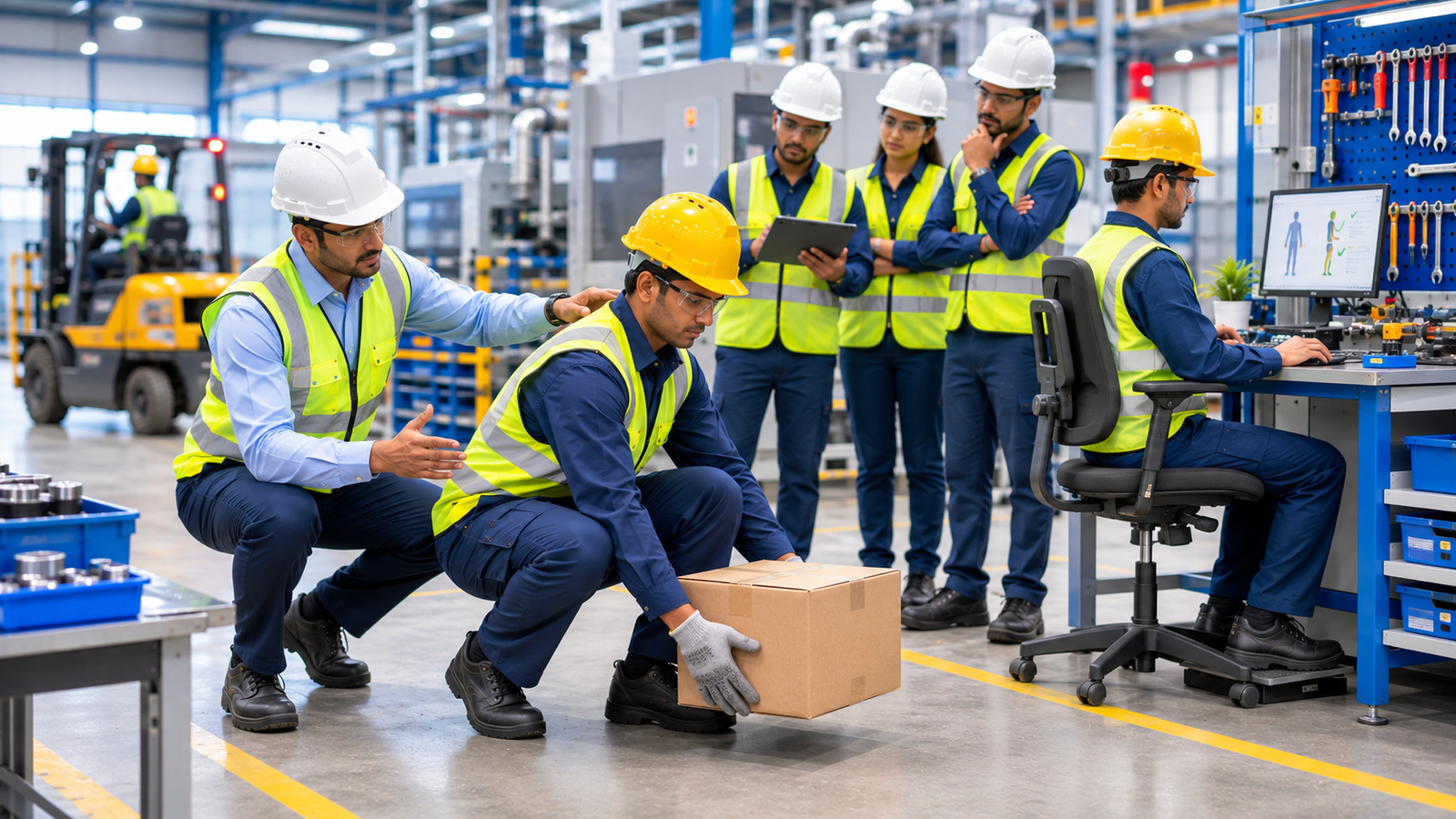
Participants learn to recognise poor posture, excessive force, repetitive movements, manual-handling risks, workstation issues, and other physical demands that may affect workplace safety, comfort, and performance. Through practical demonstrations, workplace observations, case studies, and interactive exercises, the course develops the ability to identify ergonomic risks and implement practical improvements.
What You’ll Learn
Ergonomic Hazard Identification
Learn how to identify risks related to posture, force, repetition, vibration, duration, and workplace design.
Workplace Ergonomics
Understand how workstation layout, seating, equipment placement, and working height can influence comfort and performance.
Manual Handling
Learn practical principles for safer lifting, carrying, pushing, pulling, and material movement.
Posture Awareness
Understand how awkward, static, or prolonged postures can increase physical strain.
Repetitive Work
Recognise ergonomic risks associated with repetitive movements, cycle times, and prolonged tasks.
Practical Improvements
Learn how better tools, equipment, workstation design, work methods, and task planning can reduce ergonomic risk.
Key Training Areas
Participants are introduced to:
Ergonomics fundamentals
Ergonomic hazard identification
Workplace and workstation ergonomics
Office and computer ergonomics
Industrial ergonomics
Manual material handling
Lifting and carrying
Pushing and pulling
Neutral posture
Awkward posture
Excessive force
Repetitive movements
Prolonged work
Vibration awareness
Workstation setup
Tool and equipment design
Work height and reach
Work-rest considerations
Ergonomic risk assessment
Workplace improvement
Employee participation
Continuous improvement
Practical Ergonomics Training
Observe → Identify → Assess → Improve → Review
Participants can gain practical exposure to:
01 — OBSERVE THE TASK
Understand how the work is actually performed.
02 — IDENTIFY ERGONOMIC RISKS
Recognise posture, force, repetition, movement, workstation, and equipment-related risks.
03 — ASSESS THE DEMAND
Consider force, frequency, duration, posture, load, and environmental conditions.
04 — SELECT IMPROVEMENTS
Identify suitable engineering, work-design, administrative, or work-practice controls.
05 — ADJUST THE WORK
Improve workstation layout, tools, equipment, materials, and working methods.
06 — INVOLVE THE WORKER
Obtain feedback from the people performing the task.
07 — VERIFY THE IMPROVEMENT
Check whether the change reduces unnecessary physical demand.
08 — REVIEW & IMPROVE
Continue monitoring and improve the task when conditions change.
Understanding Good Posture
Work With Your Body — Not Against It
Participants learn how comfortable and sustainable working positions can reduce unnecessary physical strain.
Head & Neck
Avoid prolonged forward, downward, or twisted positions where reasonably practicable.
Shoulders
Keep shoulders relaxed and avoid unnecessary elevation or reaching.
Arms
Keep frequently used tools and materials within a comfortable working range.
Wrists & Hands
Avoid prolonged extreme wrist positions during repetitive or forceful tasks.
Back
Encourage comfortable working positions and minimise unnecessary bending and twisting.
Legs
Provide sufficient space and avoid restrictive positions for extended periods.
Feet
Maintain stable support and comfortable positioning during standing tasks.
Good Ergonomics Means Designing the Work Around the Person.
Office & Computer Ergonomics
Small Adjustments Can Make a Big Difference
Participants learn practical workstation considerations:
CHAIR
Adjust seating and back support to provide a comfortable working position.
MONITOR
Position the screen appropriately to reduce unnecessary neck and visual strain.
KEYBOARD
Maintain a comfortable position for hands and wrists.
MOUSE
Keep the mouse within an easy and natural reach.
LIGHTING
Reduce glare and provide suitable workplace illumination.
DESK
Maintain adequate working space and appropriate working height.
FREQUENTLY USED ITEMS
Keep regularly used items within a practical reach zone.
Computer Workstation Checklist
Set Up. Sit Smart. Work Comfortably.
Before starting computer-based work, consider:
Chair adjusted appropriately
Back adequately supported
Feet comfortably supported
Screen positioned appropriately
Keyboard comfortably positioned
Mouse within easy reach
Shoulders relaxed
Wrists in a comfortable position
Frequently used items within reach
Glare controlled where possible
Adequate workspace available
Regular changes in posture encouraged
Manual Material Handling
Lift Smarter — Not Just Stronger
Participants learn practical principles for safer manual handling.
Before Lifting
Assess the load.
Consider its weight, size, and shape.
Check the route and destination.
Determine whether assistance is required.
Use suitable mechanical handling equipment where available.
During Handling
Maintain a stable stance.
Keep the load reasonably close to the body.
Avoid unnecessary twisting.
Move smoothly and deliberately.
Use appropriate assistance for heavy or awkward loads.
After Handling
Place the load securely.
Avoid unstable stacking.
Keep pathways clear.
Report difficult or unsafe handling conditions.
The Safest Lift Is Often the One That Does Not Need to Be Performed Manually.
Lifting, Carrying, Pushing & Pulling
Ergonomic risk can increase when tasks involve:
HIGH FORCE
Heavy or difficult-to-handle loads.
REPETITION
Frequent performance of the same movement.
AWKWARD POSTURE
Bending, twisting, reaching, kneeling, or overhead work.
LONG DURATION
Maintaining physical demands for extended periods.
POOR LOAD DESIGN
Loads that are unstable, difficult to grip, or difficult to see around.
HIGH PUSH / PULL FORCE
Moving equipment or materials requiring excessive effort.
Reduce the Physical Demand Where the Work Can Be Better Designed.
Common Ergonomic Risk Factors
Recognise the Risk Before It Becomes a Problem
FORCE
Excessive physical effort or high manual force.
REPETITION
Frequent repeated movements.
POSTURE
Awkward, static, or sustained positions.
DURATION
Long periods of physical exposure.
VIBRATION
Exposure to vibrating tools or equipment.
ENVIRONMENT
Lighting, temperature, workspace, and other conditions affecting the task.
EQUIPMENT DESIGN
Tools or equipment that require excessive force or awkward positioning.
Ergonomic Risk Assessment
Find the Physical Strain Before It Becomes a Bigger Problem
Participants learn to consider:
TASK
What work is being performed?
PERSON
Who performs the task and what physical demands are involved?
EQUIPMENT
Is the equipment suitable for the task?
LOAD
What is being moved, handled, or manipulated?
POSTURE
What body position is required?
REPETITION
How frequently is the movement performed?
DURATION
How long does the exposure continue?
FORCE
How much physical effort is required?
ENVIRONMENT
Does the workplace layout or environment contribute to the risk?
Industrial Ergonomics
Design the Job to Fit the Worker
Participants learn to apply ergonomic principles to:
- Production lines
Assembly operations
Machine operation
Maintenance activities
Material handling
Warehousing
Packaging
Inspection work
Tool use
Repetitive production
Workstations
Loading and unloading
Good industrial ergonomics can support safer work, improved comfort, better efficiency, and reduced unnecessary physical workload.
Ergonomic Improvements
Control the Risk at Its Source
Participants explore practical improvement strategies:
01 — ELIMINATE
Remove unnecessary manual, repetitive, or awkward tasks where reasonably practicable.
↓
02 — SUBSTITUTE
Use safer methods, equipment, or processes.
↓
03 — ENGINEERING CONTROLS
Redesign tools, equipment, workstations, material flow, or working heights.
↓
04 — ADMINISTRATIVE CONTROLS
Improve task planning, scheduling, job rotation where appropriate, training, and work organisation.
↓
05 — WORK PRACTICES
Encourage appropriate posture, movement, handling, and task techniques.
Better Work Design Is the Strongest Starting Point for Ergonomic Improvement.
Workplace Ergonomic Assessment
Look at the Whole Workstation
A practical assessment may consider:
WORK HEIGHT
Is the working height appropriate for the task?
POSTURE
Does the task require bending, twisting, reaching, or overhead work?
MATERIAL LOCATION
Are frequently handled materials positioned appropriately?
TOOLS
Are tools suitable, accessible, and easy to operate?
LIGHTING
Is the task adequately illuminated?
MOVEMENT
Are unnecessary movements or long reaches required?
WORK PATTERN
Are prolonged or repetitive exposures present?
SEATING
Is suitable seating available where required?
Repetitive Work
Repetition + Force + Awkward Posture = Increased Risk
Participants learn how repetitive work can be influenced by:
Task frequency
Cycle time
Force requirements
Posture
Workstation design
Tool design
Exposure duration
Recovery opportunities
Work organisation
Potential improvements may include:
Better workstation design
Appropriate tools
Improved material placement
Reduced unnecessary movement
Task variation
Job rotation where appropriate
Mechanical assistance
Process redesign
Reduce Repetition, Reduce Force, Improve the Task.
Ergonomics in Warehousing & Logistics
Participants learn to identify ergonomic risks associated with:
Picking and packing
Manual lifting
Trolley movement
Loading and unloading
Reaching and stacking
Repetitive handling
Prolonged standing
Excessive walking
Awkward or unstable loads
Better Material Flow Means Less Unnecessary Physical Effort.
Employee Participation
The Person Doing the Job Often Knows the Job Best
An effective ergonomics programme encourages employees to:
Report difficult tasks.
Identify uncomfortable workstations.
Suggest practical improvements.
Participate in ergonomic assessments.
Report recurring physical demands.
Support workplace improvement initiatives.
Share lessons learned with their teams.
Listen to the Worker. Improve the Work.
Learning Outcomes
After completing the course, participants will be able to:
Understand the fundamentals of workplace ergonomics.
Identify common ergonomic risk factors.
Recognise awkward and sustained postures.
Understand the effects of excessive force and repetition.
Apply basic principles of safer manual handling.
Identify ergonomic risks in office environments.
Understand basic workstation setup principles.
Recognise ergonomic risks in industrial environments.
Conduct basic ergonomic observations.
Identify opportunities for workplace improvement.
Understand practical ergonomic control measures.
Improve awareness of posture and movement.
Recognise the importance of employee participation.
Support ergonomic risk-reduction initiatives.
Contribute to a healthier, safer, and more efficient workplace.
Who Can Attend?
This course is suitable for:
Safety Officers • HSE Professionals • Engineers • Supervisors • Managers • Production Personnel • Maintenance Teams • Warehouse Personnel • Office Employees • HR & Training Teams • Safety Committee Members • Workers
Training Approach
Observe → Assess → Adjust → Improve
The course combines:
Classroom Learning
Core ergonomics concepts and workplace risk factors.
Posture Demonstrations
Understanding neutral and awkward working positions.
Workstation Exercises
Practical office and workstation assessment and setup.
Manual Handling Demonstrations
Safer principles for lifting, carrying, pushing, and pulling.
Ergonomic Observation Exercises
Identifying ergonomic hazards in realistic work situations.
Workplace Case Studies
Analysing industrial, warehouse, office, and maintenance activities.
Interactive Discussions
Developing practical solutions based on workplace challenges.
Ergonomic Improvement Cycle
Better Work Design. Better Performance. Better Workplace.
01 — OBSERVE
Understand how the work is performed.
↓
02 — IDENTIFY
Find ergonomic hazards and physical risk factors.
↓
03 — ASSESS
Evaluate force, posture, repetition, duration, vibration, and other factors.
↓
04 — CONTROL
Introduce appropriate engineering, administrative, or work-practice controls.
↓
05 — ADJUST
Optimise workstations, tools, equipment, materials, and work methods.
↓
06 — INVOLVE
Obtain feedback from people performing the work.
↓
07 — REVIEW
Check whether the changes are effective.
↓
08 — IMPROVE
Continue improving the work environment and task design.
Key Benefits
For Workers
Improve awareness of posture, movement, manual handling, and ergonomic hazards.
For Supervisors
Recognise ergonomic problems and support practical improvements within their teams.
For Safety Professionals
Strengthen ergonomic hazard identification and workplace assessment skills.
For Managers
Support healthier work design, employee engagement, productivity, and workplace safety.
For Organisations
Reduce unnecessary physical demands, improve workplace design, strengthen employee awareness, and support a safer, more comfortable, and productive working environment.
Why Ergonomics Matters
People interact with tools, machines, workstations, materials, and processes every day. When work is poorly designed, unnecessary physical demands can develop.
Ergonomics focuses on fitting the work to the person by improving task design, equipment, workstation layout, movement, material handling, and working methods.
Design Better. Move Smarter. Work Safer.
Ergonomics
Fit the Work to the Person. Build a Safer, Healthier Workplace.
Develop the practical knowledge required to identify ergonomic hazards, improve posture and manual-handling practices, assess workplace demands, optimise workstations, and create safer and more efficient working environments.